Most missed appointments aren’t patients who don’t care. They’re patients who forgot, or who never opened the email. This release puts your reminders where people actually look: their phone’s lock screen. It also gives patients an easy way to tell you they’re coming. Here’s what’s new, and how to turn each piece on.
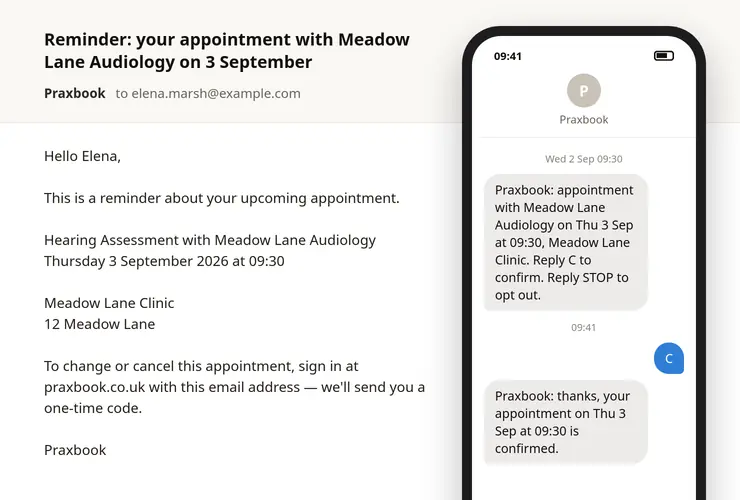
SMS text reminders
Praxbook can now text your patients as well as emailing them. A patient with a UK mobile number on file gets:
- a text when they book, with the date, time and place
- a reminder before the appointment, at the number of hours you choose
- a text if the appointment moves, saying so first, so it isn’t mistaken for a second booking
The texts are short and name you, the day, the time and the location. They don’t name the treatment, because a text can be read on a lock screen by whoever is nearby.
Emails carry on exactly as before. Each patient gets both.
How to turn it on
- Open Practice details: choose Practice in the menu under your initials at the top right, or the Practice details card on the Settings page.
- Tick Text patients about their bookings.
- Check Remind patients this many hours before. 24 is the default. Leave it blank if you don’t want reminders at all.
Changes take effect straight away, including for reminders that are already scheduled. Switch texts on today and patients booked for next week still get their reminder. Change the hours and pending reminders move to the new time.
50 texts a month are included in your subscription, about 20 appointments’ worth. There’s no upgrade to buy and nothing extra on your bill. Practice details shows how many you’ve used this month, and you’ll get an email when you’re close. If you reach 50, texts stop until the 1st of the next month and emails still go, so no patient goes without a reminder. Need more than 50? Get in touch.
The allowance may change in future, as our terms say. If it ever goes down, we’ll tell you at least 30 days before.
“Reply C to confirm”
Every reminder ends with Reply C to confirm. When a patient replies, three things happen:
- the appointment is marked as confirmed, and the appointment page shows Confirmed by patient: Yes, by text on that date
- the patient gets a short reply naming the date and time, so they know it worked and don’t need to phone
- nothing else changes: the appointment stays booked either way
Silence means nothing. A patient who doesn’t reply keeps their appointment, because a text that never arrived looks exactly like a patient who ignored it. What confirmation gives you is a list of who has replied, so you know which patients are worth a quick call the day before.
A patient who replies “yes” or “ok” instead of C is confirmed too.
One thing to know: the texting number isn’t monitored. If a patient replies with anything else, they’re told straight away that the number can’t receive messages, and given your name and phone number to contact you. Their message isn’t stored or forwarded anywhere. That’s deliberate: one number sends for every practice, so a forwarded reply could end up with the wrong practitioner.
Patients can reply STOP to stop texts at any time. If someone does, you’ll get an email saying texts to that patient have stopped, so you know their reminders will come by email only.
A quicker booking page for your patients
Choosing a time on your booking page now takes fewer taps, especially on a phone:
- Picking a day takes the patient straight to that day’s timeslots, rather than leaving them to scroll down to find them.
- Continue stays in view once a time is picked.
- Moving between months, or between days, no longer reloads the page.
The page still works fully with JavaScript switched off, as it always has.
Clearer consent forms
- Optional questions now say “(optional)”, so a patient can see which ones they can skip before pressing Submit.
- A required question left empty is flagged right under it. Before, the browser showed a pop-up that could sit on top of the very answers the patient needed to tick.
When a returning patient books with a new phone number
If a patient who already has an account books with a different phone number, Praxbook no longer swaps the number on their account. Anyone can type any email into a public booking form, and a stranger’s number shouldn’t take over someone else’s reminders.
Instead:
- the appointment page shows Phone given at booking, marked “not confirmed”
- the patient’s confirmation email mentions it, and the next time they sign in they’re asked which number to keep
Once they choose, their reminders go to the right number.
Easier sign-in
- The sign-in code is now in the email’s subject line, so you can read it from the notification without opening the email.
- Pasting the code works even if a full stop comes with it.
A profile menu in the header
When you’re signed in, the circle with your initials at the top right opens a menu:
- Profile: your name, email and phone
- Practice: Practice details, where your booking link and your email and text switches live
- Settings: everything else you set up once
It also shows which account you’re signed in as.
Try it
Everything here is live now. If you’re already using Praxbook, choose Practice in the menu at the top right and tick Text patients about their bookings. Your next booking will get a text.
New here? Start your free trial. And if you know a practitioner who’s still ringing patients the day before every appointment, send them this post.