Online booking and consent forms for independent practitioners

Run your private practice with simple online booking, patient screening, consent forms, and appointment management—all in one place.
Praxbook is a lightweight booking system for ear wax removal practitioners, counsellors, therapists, and other professionals running a practice of one. Give patients your own booking link where they can view your availability, book appointments, complete forms, and manage their bookings without calling you.
No expensive clinic-management software. No public directory listing. No app or JavaScript required.
- Let patients book online: A simple calendar shows available days and timeslots.
- Reduce interruptions: Patients can reschedule or cancel their own appointments.
- Screen patients before appointments: Collect the information and consent forms you need in advance.
UK GDPR — your data is stored in the UK, and you stay the controller of your patient records. Read our DPA · How we handle it
30 days free. No card needed.
Your questions, answered before they book
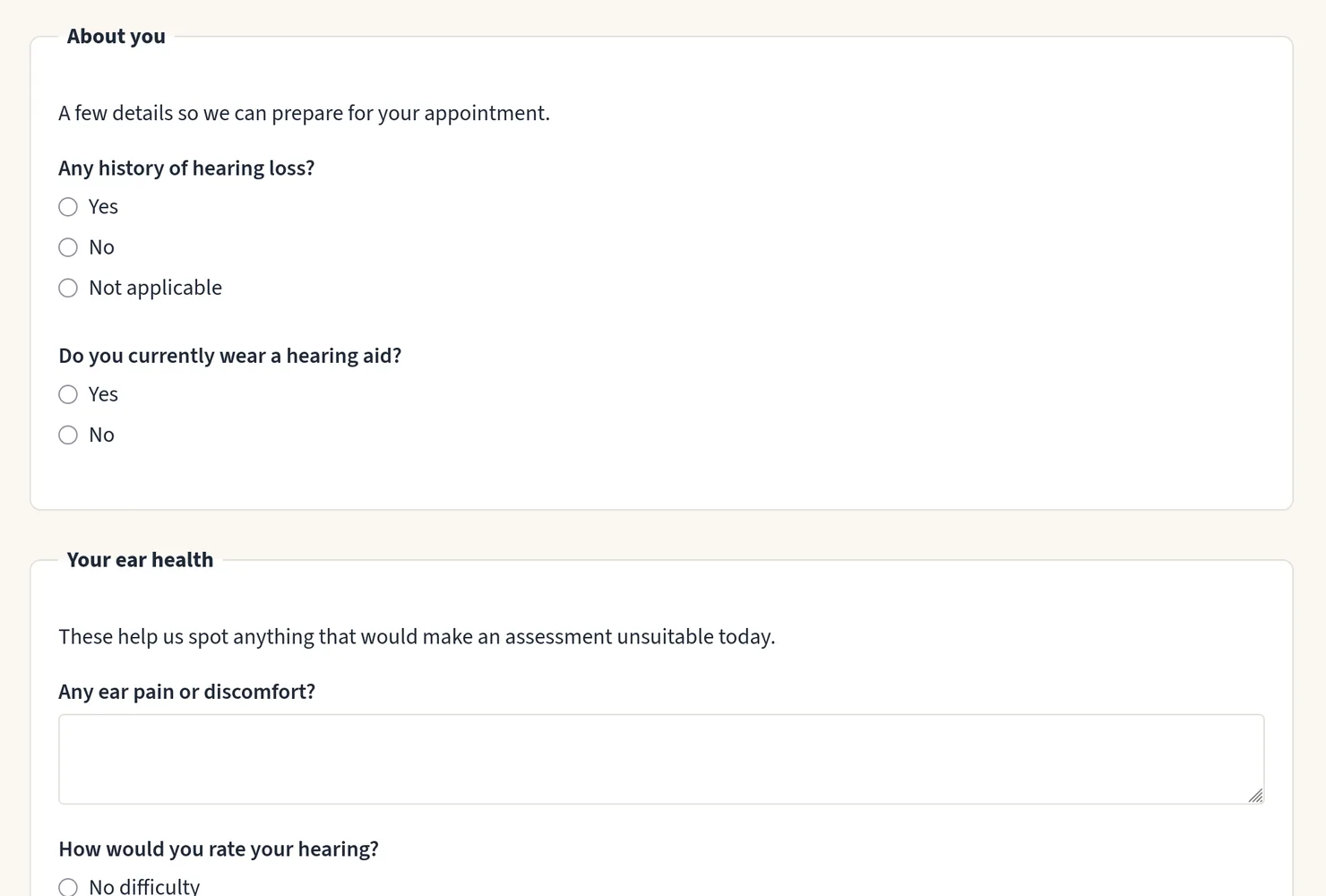
Every service can carry its own consent form — your intake and screening questions, asked at the point of booking. Patients complete it before they reserve a timeslot, so you catch contraindications, unsuitable bookings and missing information before anyone travels — not after.
- Group questions under headings, so a long form reads as sections rather than a list.
- Answers are stored with the appointment, not left in your inbox.
More about online consent forms
A generic scheduler hands you a timeslot picker. It screens nobody.
One schedule, everything together

Your whole appointment schedule on one screen — every booking that still stands, with its date, time, patient, service and location. Open one and the patient's answers are already there, with a full history of what changed and when.
- Every change is logged — what happened, and when.
- Filter by date range or location, and open any appointment straight from the row.
Clinic practice-management software is built for staff, rooms and billing teams. Running a practice of one, that is a lot of software to learn.
Your day, your shape

Set your opening hours for each location, add the breaks that recur every week, and book time off. Offer patients every free timeslot, or only the first few of each day so bookings fill back to back instead of scattering across the week.
- Multiple locations, each with its own hours. Patients pick where they want to come.
- Breaks recur weekly, time off is dated, and both simply close the time.
Notes the patient never sees

Write a treatment note against a patient, or against one appointment, and find it again by searching the words you wrote. Your notes are yours: never on a patient-facing page, never in an email.
- Full-text search across everything you have written.
- The patient's own note from the booking form stays separate, and stays labelled as theirs.
A scheduler has nowhere to put this. A clinic system has somewhere, and four other people who can open it.
Reminders with nothing hidden in them

Praxbook sends automatic email reminders and text reminders — when your patient books, if the appointment moves, and again before it — and emails you when someone books or cancels, so you are not watching a calendar to find out.
- Every reminder text ends “Reply C to confirm”. A reply marks the appointment confirmed, so you know who still needs a call; no reply cancels nothing.
- 50 texts a month, about 20 appointments’ worth, are included in your subscription, with no upgrade to buy. Need more? Get in touch.
- Plain text, no tracking pixel, and no link that logs anyone in — the email carries the site's address, never a key to the record.
- Every message is recorded before it is sent, including the ones we skip and the reason why.
A one-click link to health data is a password you cannot change. We ask for the email address instead, and send a code.
Praxbook vs Calendly, Cliniko and Fresha
vs. generic schedulers (Calendly, Cal.com)
They hand you a timeslot picker. You need a consent form and an audit trail too.
vs. clinic practice-management software (Cliniko, Jane, WriteUpp)
Built for clinics with staff, rooms, and billing teams. If you're running a practice of one, that's a lot of software to learn for one person. Coming from Cliniko, you can bring your patients, appointments, consent forms and treatment notes with you. How switching from Cliniko works
vs. marketplace booking (Fresha)
Free because you're the product — marketplace fees, and they own the client relationship. Your patients stay yours.
Praxbook sits in between: everything a solo practitioner needs, nothing they don't.
Early access pricing
Limited to the first 50 practitioners
£19/month or £190/year
Locked for life. 30 days free, no card needed.
Then £24/month or £240/year for new customers after that.
Includes 50 texts a month to your patients, about 20 appointments’ worth. Need more? Get in touch.
Frequently asked questions
Do my patients need an account or a password?
No. Patients book with their name and email — nothing to sign up for, and no password, ever. To change or cancel later, they sign in with that email and we send them a one-time code.
Is there an app to install?
No, deliberately. It runs in any browser, and the booking flow works with JavaScript switched off — which is what keeps it usable on a slow connection, on an old phone, and with a screen reader.
Will my booking page be listed in a directory?
No. You choose who gets your link. It is deliberately absent from our sitemap and always will be: a public list of every practitioner using Praxbook would be a directory, and a roster of our customers.
Can patients pay through it?
No. Praxbook books appointments and screens patients; taking payment stays yours, however you do it today. There is no per-booking fee and no marketplace cut.
Do you send SMS text reminders?
Yes. Patients with a UK mobile get a text when they book, if the appointment moves, and before it, alongside the email, once you switch texts on. They can reply C to confirm. Your subscription includes 50 texts a month, about 20 appointments’ worth; if you need more, get in touch.
Can I move an existing practice across?
From Cliniko, yes: patients, appointments with the length each one actually ran, consent forms, and treatment notes attached to the visit they were written during. You see the whole import in a preview before anything is saved. We add other systems as practitioners need them — if you are moving from somewhere else, tell us which.
Where is my data stored?
In the UK. Your patient records stay yours — we hold them on your behalf and use them for nothing else.
Do you offer a data processing agreement?
Yes. You are the controller of your patient records and we are your processor, and our Data Processing Agreement is the written contract between us. It is part of our terms, so it applies from the day you sign up, and it names every sub-processor we use.
Already booked with one of our practitioners?
You already have an account. Log in with just your email — we'll send you a one-time code, no password required. Manage all your bookings in one place: view details, reschedule, or cancel anytime.